收費電視安裝與續約
查詢安裝、搬遷、續約和各計劃比較。
在高密度居住環境中,主力牆是 Wi-Fi 訊號的最大天敵。透過正確的設備選購與擺位,您可以在 500 呎甚至更大的單位實現無縫漫遊。
In high-density living environments, load-bearing walls are the ultimate enemy of Wi-Fi. With proper equipment selection and placement, you can achieve seamless roaming even in 500+ sq ft flats.
香港典型的厚身主力牆含大量鋼筋,會吸收並阻擋絕大部分的 5GHz 頻段訊號。這是造成「房內收不到訊號」的主要原因。
舊式唐樓常見的磚牆雖然比主力牆薄,但仍會顯著削弱訊號強度,導致傳輸速度大幅下降。建議在轉角位增加節點。
現代屋苑常用的玻璃或大型穿衣鏡會引起訊號反射,導致多徑干擾,影響 Wi-Fi 穩定性。擺放路由器時應避開反射面。
Typical thick load-bearing walls in HK contain heavy rebar, which absorbs and blocks most 5GHz signals. This is the primary cause of 'dead zones' in bedrooms.
Brick walls common in older Tong Laus are thinner than load-bearing walls but still significantly weaken signal strength, causing drastic speed drops. Adding nodes at corners is advised.
Modern glass partitions or large mirrors cause signal reflection and multi-path interference, affecting stability. Avoid placing routers near reflective surfaces.
| 項目 | 詳情 | 比較 |
|---|---|---|
| 覆蓋範圍 | 單一路由器難以穿透兩道主力牆,而 Mesh 系統可透過多個節點將訊號延伸至全屋每一個角落。 | 單點 vs. 全屋覆蓋 |
| 自動切換技術 | 使用 Mesh 系統時,手機會在您走動時自動連接最強訊號的節點,不會像訊號放大器般出現斷線。 | 手動切換 vs. 無縫漫遊 |
| 設置難易度 | 現代 Mesh 系統通常配備專用手機 App,只需幾分鐘即可完成配對,並自動優化頻道選擇。 | 複雜 vs. 一鍵配對 |
| Item | Details | Comparison |
|---|---|---|
| Coverage Range | A single router struggles to penetrate two load-bearing walls, whereas Mesh systems extend signals to every corner via multiple nodes. | Single Point vs. Whole Home |
| Seamless Roaming | With Mesh, your phone automatically connects to the strongest node as you move, avoiding the disconnections common with range extenders. | Manual vs. Seamless |
| Setup Complexity | Modern Mesh systems usually come with dedicated mobile apps, allowing pairing and channel optimization in just a few minutes. | Complex vs. Easy App |
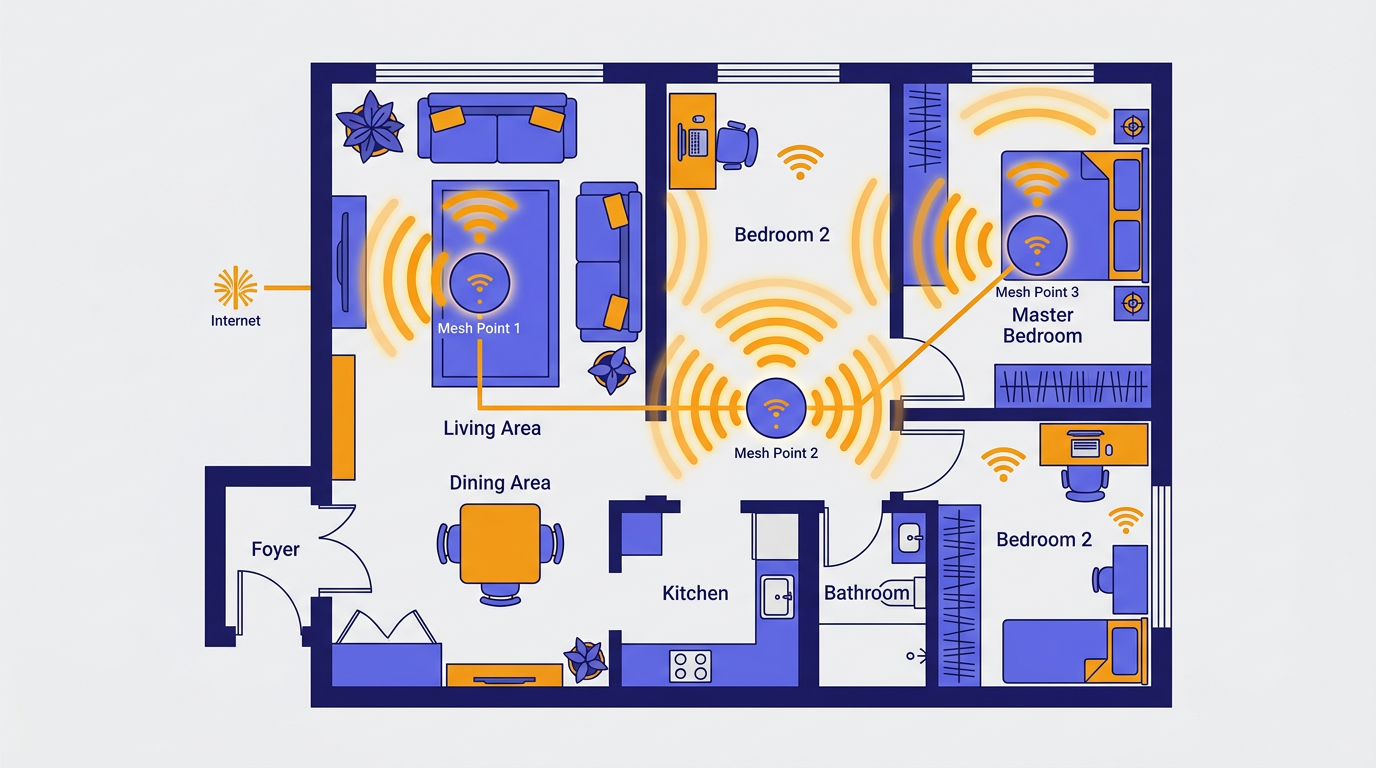
將主機放置在客廳中央,避開電視櫃後方或弱電箱內,確保訊號能以最短距離穿過第一道牆。
分機節點應放在走廊或房門口,而非房間深處。確保分機能與主機「看見」彼此,維持高速回傳。
香港複式單位或唐樓需考慮垂直覆蓋。將天線調整至不同角度,並使用手機 App 測試每個角落的延遲值。
Place the main unit in the center of the living room, avoiding TV cabinets or metal boxes, to ensure the signal hits the first wall at the shortest distance.
Satellite nodes should be placed in hallways or near doorways, not deep inside rooms. Ensure satellites can 'see' the main unit for high-speed backhaul.
For duplexes or Tong Laus, consider vertical coverage. Adjust antennas to different angles and use an app to test latency in every corner.
如果您的新裝修屋苑已預留牆身網絡插座,請務必將 Mesh 節點以 LAN 線連接。這被稱為「有線回傳」,能將節點間的傳輸損耗降至零,提供最穩定的千兆網絡體驗。
If your newly renovated estate has pre-installed wall LAN ports, always connect Mesh nodes via Ethernet. This is called 'Ethernet Backhaul,' reducing inter-node loss to zero for a stable Gigabit experience.
查詢安裝、搬遷、續約和各計劃比較。
串流、高清直播、在家工作 — 比較各寬頻方案。
數碼電視重掃、天線檢查、室內線路維修。
免費台、收費電視、寬頻、固網電話一次處理。
Installation, relocation, renewal, and plan comparisons.
Streaming, HD live TV, work from home — compare plans.
Digital TV rescanning, antenna checks, cable repair.
Free TV, pay TV, broadband, and landline in one go.
Techiteasy 的專家團隊擁有多年處理香港複雜住宅環境的經驗。立即瀏覽 kingbroadband.com,獲取最新寬頻優惠及專業 Mesh 系統安裝諮詢,讓您的家居網絡不再有死角。
Techiteasy's expert team has years of experience handling Hong Kong's complex residential environments. Visit kingbroadband.com today for the latest broadband deals and professional Mesh installation consulting to eliminate dead zones forever.